Sunday, March 27, 2016

download the archived yojimbo 4 database from S3 using a command line script


#!/usr/bin/env ruby
require 'aws-sdk-v1'
require 'fileutils'


now = Time::now
now_str = now.strftime("%Y-%m-%d")
puts "now_str=#{now_str}"
zip_filename = "Yojimbo-#{now_str}.zip"
outputFile = "/tmp/#{zip_filename}"

system "open", "/tmp"
FileUtils.cd("/tmp")


# http://docs.aws.amazon.com/AmazonS3/latest/dev/UploadObjSingleOpRuby.html
AWS.config(
  :access_key_id => ENV["ASA_S3_ACCESS_KEY_ID"],
  :secret_access_key => ENV["ASA_S3_SECRET_ACCESS_KEY"])

bucket_name = "smr.prepware.com"
file_name = zip_filename

puts "downloading #{zip_filename} from bucket: #{bucket_name}"

# get an instance of the S3 interface using the default configuration
s3 = AWS::S3.new

# get a ref to an existing bucket
bucket = s3.buckets[bucket_name] # no request made
puts "bucket=#{bucket}"

obj = bucket.objects[file_name]

# http://docs.aws.amazon.com/AWSRubySDK/latest/AWS/S3/S3Object.html
# streaming download a file from S3
# mode wb = write, binary
File.open(zip_filename, 'wb') do |file|
  obj.read do |chunk|
    file.write(chunk)
  end
end

# TODO: 
# kill Yojimbo process
# delete existing app support folder
# copy downloaded one over
# restart Yojimbo


Friday, March 25, 2016

xmlrpc tests for pwo


[smr@smr xmlrpc-tests (master)]$ pwd
/Users/smr/current_projects/pws2016-work/xmlrpc-tests
[smr@smr xmlrpc-tests (master)]$ ll
total 64
drwxr-xr-x  10 smr  staff   340 Mar 25 19:10 .
drwxr-xr-x   8 smr  staff   272 Mar  4 15:25 ..
-rwxr-xr-x   1 smr  staff  1529 Mar 25 19:13 check-code-abuse-prod.rb
-rwxr-xr-x   1 smr  staff  1441 Mar 25 16:27 check-code-abuse.rb
-rwxr-xr-x   1 smr  staff  1202 Jul 23  2015 check-deactivated-code-xmlrpc.rb
-rwxr-xr-x   1 smr  staff  1441 Mar 25 16:42 check-deactivated-code.rb
-rwxr-xr-x   1 smr  staff   390 Mar  4 15:06 test-localhost.rb
-rwxr-xr-x   1 smr  staff   395 Mar  4 15:16 test-pwo-live.rb
-rwxr-xr-x   1 smr  staff   400 Mar  4 15:13 test-pwo2016-dev.rb

-rwxr-xr-x   1 smr  staff   335 Jun 12  2014 tester.rb


el capitan error: no OSAXHandlers entry in its Info.plist


osascript: OpenScripting.framework - scripting addition "/Library/ScriptingAdditions/Adobe Unit Types.osax" cannot be used with the current OS because it has no OSAXHandlers entry in its Info.plist.
to recipient 2 of outgoing message id 7

logout


https://helpx.adobe.com/archive/photoshop/photoshop-cs4-troubleshooting.pdf


Unit type conversion error | AppleScript | Photoshop |
Mac OS X 10.6
Issue
When you run certain AppleScripts in Adobe Photoshop CS4 or CS3, an error displays in the OS X Console about unit
type conversion, such as "Can't make 720 into type traditional points."
Solution
The Adobe Unit Types.osax file that shipped with Photoshop CS4 and CS3 is a 32-bit component. Mac OS X 10.6 (Snow
Leopard) requires some 64-bit scripting environments. Use the following solutions to resolve the unit type error:
Solution 1: Update the Adobe Unit Types.osax to version 2.1.0.
1 Click this link to download the Adobe Unit Types.osax version 2.1.0 file.
2 Choose /Library/ScriptingAdditions.
3 Move the existing Adobe Unit Types.osax file to a backup location.
4 Copy the downloaded version of the Adobe Unit Types.osax file to the /Library/ScriptingAdditions folder. Select Yes
to authenticate this operation.
5 Restart your computer.
Solution 2: Run AppleScript Editor in 32-bit mode.
1 Choose Get Info on the AppleScript Editor.
2 Select Open in 32-bit mode.
Solution 3: Use the Arch command in your command-line tool.
Instead of executing "osascript xx", execute "arch -i386 osascriptxx". 

Saturday, March 5, 2016

update kindle to 3.4.2

IE-specific authentication(?) error with pwo 2016


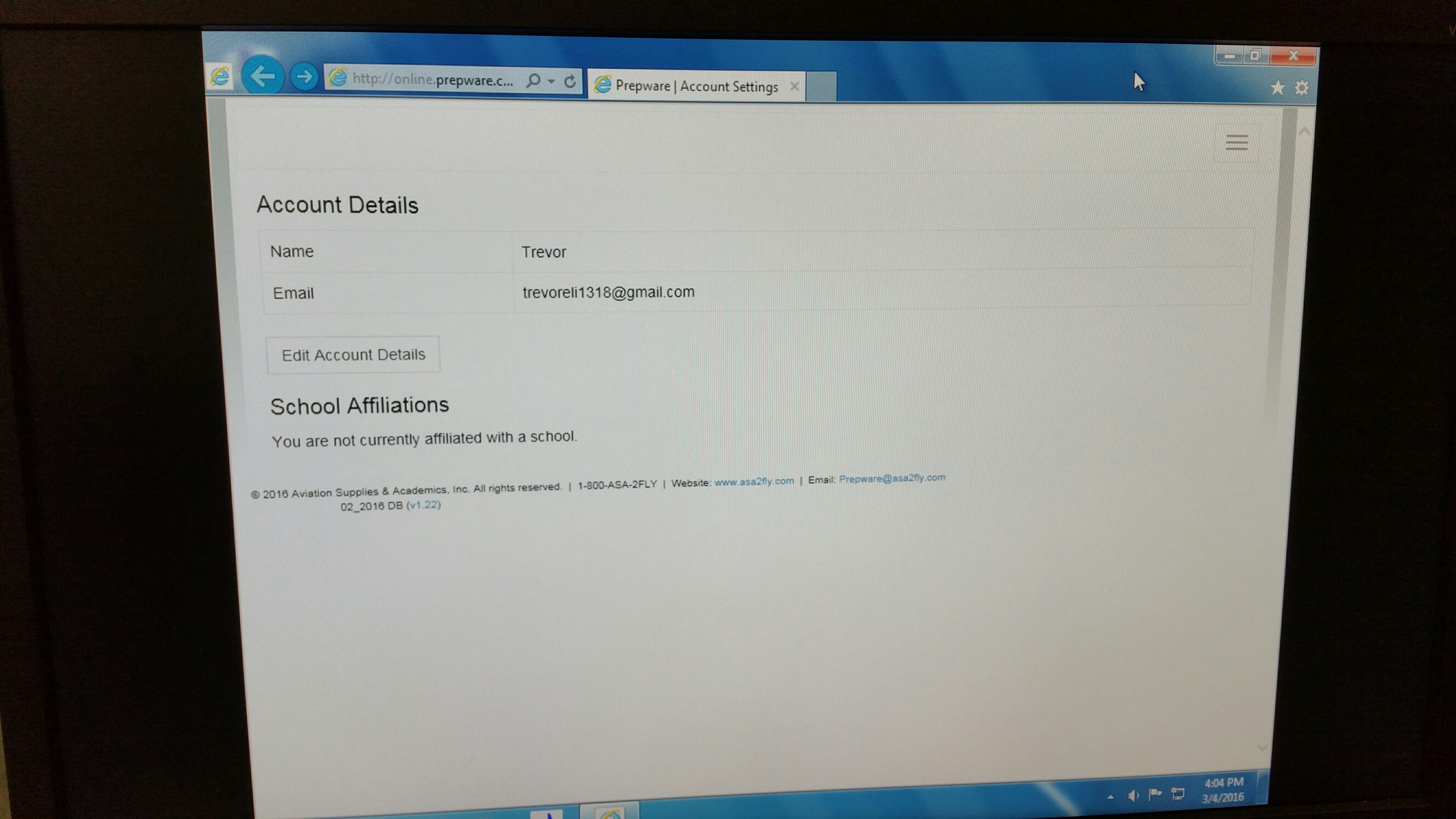
Please see attached picture. This same issue was reported to me yesterday and I thought the guy was just screwing something up. He ended up changing browsers and it worked so I blew it off. Now Spartan college is reporting the same issue on all their computers so I requested a picture.

In both instances this issue occurred on IE Version 11. When the user tried another browser (Chrome) it worked fine.


Basically what happens is the user types prepware.com into the url in IE and this page pops up and does not allow the users to do anything. Clicking on the box with three lines in top right does nothing. No menu, not anything. Closing the browser and even clearing cookies or history didn’t appear to help either.


checked logs for this user:

Started POST "/sessions" for 64.207.244.178 at 2016-03-04 22:09:57 +0000
Processing by SessionsController#create as HTML
  Parameters: {"utf8"=>"✓", "authenticity_token"=>"Ii6AJjsWejYXrkKsS0nqqeBUI3H5ylgycnxIx4gonF+bZpiSWP1eiDayJ8Dk8IWbokgSyjhxGTU3tUG2w3s93w==", "session"=>{"email"=>"trevoreli1318@gmail.com", "password"=>"[FILTERED]"}, "commit"=>"Sign In"}
Can't verify CSRF token authenticity
  Rendered sessions/new.html.erb within layouts/application (2.4ms)
  Rendered layouts/_shim.html.erb (0.0ms)
  Rendered layouts/_masthead.html.erb (0.0ms)
  Rendered layouts/_banner2.html.erb (0.2ms)
  Rendered layouts/_navbar.html.erb (2.1ms)
  Rendered layouts/_flash_messages.html.erb (0.1ms)
  Rendered layouts/_footer.html.erb (0.1ms)
Completed 200 OK in 83ms (Views: 4.8ms | ActiveRecord: 2.9ms)


cookie-related?

http://stackoverflow.com/questions/28767059/does-rails-4-2-use-secret-token
http://guides.rubyonrails.org/upgrading_ruby_on_rails.html
https://github.com/plataformatec/devise/issues/2734

look at cookies in chrome:

chrome://settings/cookies


instead of doing this:
Use your existing secret_key_base from the secret_token.rb initializer to set the SECRET_KEY_BASE environment variable for whichever users running the Rails application in production mode. Alternatively, you can simply copy the existing secret_key_base from the secret_token.rb initializer to secrets.yml under the production section, replacing '<%= ENV["SECRET_KEY_BASE"] %>'.

i just created a new secret key for production


https://coderwall.com/p/8z7z3a/rails-4-solution-for-can-t-verify-csrf-token-authenticity-json-requests

I am using Rails 4.2.5 My authentication is home made based on M. Hartl tutorial. Everything worked well until yesterday. Today, after a bundle update I cannot get a session for user logging in. The error in the Puma server log is: "Can't verify CSRF token authenticity" I attempted all the suggestions above but none is working in my case. Any help to overcome this will be much appreciated.


_pws2013_session cookie (viewed in chrome)

Name: _pws2013_session
Content:  BAh7B0kiD3Nlc3Npb25faWQGOgZFRkkiJWJkMzU1YTE2YmUyNzljZmNmNGQzY2E1NjQ3OWJkMDI5BjsAVEkiEF9jc3JmX3Rva2VuBjsARkkiMXA1VWpTcGw0dUc2dWJhZlBKSW1zaExTOXNXTkVKSzBpVGhvb0hEeXpjTms9BjsARg%3D%3D--1918eef9eb24855c8004b08fb39c960252d62b10
Domain: online.prepware.com
Path: /
Send for: Any kind of connection
Accessible to script: No (HttpOnly)
Created:  Wednesday, March 2, 2016 at 2:47:02 PM
Expires:  When the browsing session ends


Friday, March 4, 2016

add a tail task to view production log (capistrano 3 syntax)


http://stackoverflow.com/questions/23850404/undefined-method-run-for-mainobject

syntax has changed from v2.


task :tail do
  on roles :all do
    execute :tail, "-n 500 #{File.join(current_path,'log',"#{fetch(:stage)}.log")}"
  end
end

Thursday, March 3, 2016

therubyracer install fails


http://stackoverflow.com/questions/20442763/error-when-running-bundle-install-on-mac-therubyracer-failing-to-install


$ gem uninstall libv8 # ignore if this fails
$ gem install libv8 -v 3.16.14.3 -- --with-system-v8 # 2013-08 x86_64-darwin-12 (32.6 MB)
Also edit your Gemfile and force a newer version of therubyracer

gem "therubyracer", "~> 0.12"
Then try again:

$ bundle update